Authentication
You can implement and register handlers (authenticators) to authenticate a client when the client initially connects to Diffusion™ Cloud or re-authenticates.
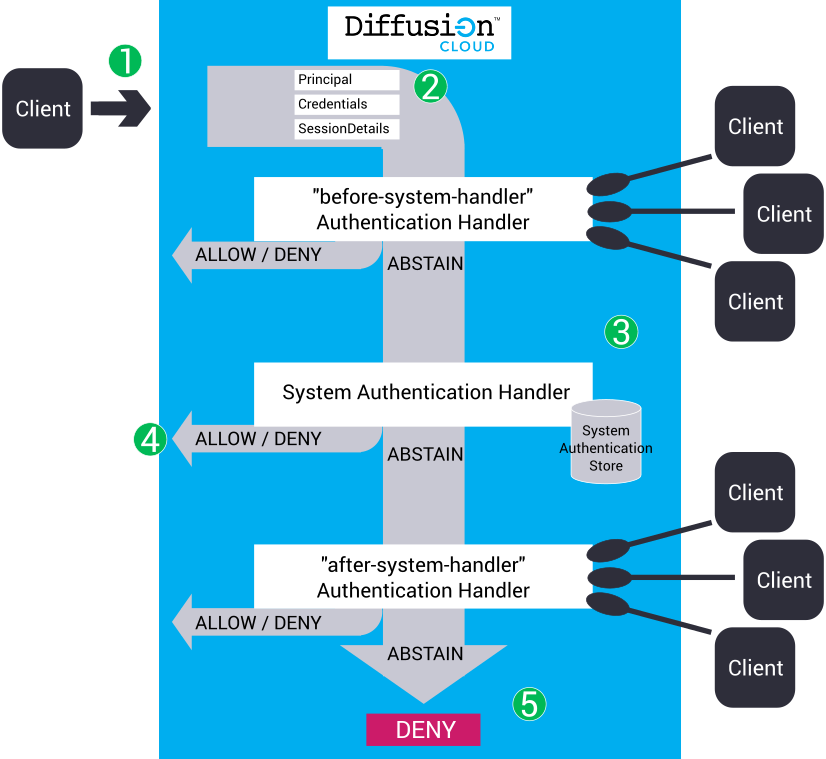
- A client tries to connect to Diffusion Cloud or re-authenticate.
-
Diffusion
Cloud
provides the following information about the
client session to the authenticators:
- Principal
- A String that contains the name of the principal or identity that is connecting to Diffusion Cloud or performing the action. This can have a value of ANONYMOUS.
- Credentials
- The Credentials object contains byte data that holds a piece of information that authenticates the principal. This can be empty or contain a password, a cryptographic key, an image, or any other piece of information. The authenticator is responsible for interpreting the bytes.
- SessionProperties
-
This contains information about the client. The available details depend on what information Diffusion Cloud holds about the client session. Some session information might not be available on initial connection.
This information can be used in the authentication decision. For example, an authenticator can only allow connection from clients that connect from a specific country.
When it registers with the server, a control authenticator can specify what details it requires, so only these details are sent by Diffusion Cloud (if available). This reduces the amount of data sent.
The authenticator is passed two property maps.- The sessionProperties map contains the fixed properties for the session, and if re-authenticating, can also contain the user-defined properties of the current session.
- The proposedProperties map contains any user-defined properties proposed by the client when opening, or re-authenticating the session.
Client-proposed session properties can provide additional information about the client that can be used later to select or filter sessions. They can also provide credential information for use in the authentication decision.
- Callback
- A callback that the authenticator can use to return a decision to Diffusion Cloud by using the callback's allow(), deny(), or abstain() method.
-
Diffusion Cloud calls authenticators in the following order:
- before-system-handler
- An authenticator that has been registered with Diffusion Cloud using the name "before-system-handler". Use the AuthenticationControl feature of the API to develop and register your authenticator.
- System authentication handler
- A system authenticator that uses the information defined in the system administration store to make the decision whether to allow, deny, or abstain from the authentication decision.
- after-system-handler
- An authenticator that has been registered with Diffusion Cloud using the name "after-system-handler". Use the AuthenticationControl feature of the API to develop and register your authenticator.
If multiple authenticators are registered against the same name, for example – "before-system-handler", only one of these authenticators is called. Diffusion Cloud load balances the authentication requests across all authenticators registered against the same name.
- Each authenticator can decide to ALLOW,
DENY, or ABSTAIN the authentication.
- If the authenticator returns ALLOW, the client is allowed to connect to Diffusion Cloud or re-authenticate. The authenticator can also provide a list of roles to assign to the client session, or set its expiry time.
- If the authenticator returns DENY, the client is allowed to connect to the server or change principal.
- If the authenticator returns ABSTAIN, the decision is passed to the next authenticator.
- If all authenticators respond with an ABSTAIN decision, the response defaults to DENY.
Client operations that require authentication
| Client operation | Behaviour if operation is allowed | Behaviour if operation is denied |
|---|---|---|
| Initial connection to server | The client connection to the server is accepted. | The client connection to the server is rejected and is dropped. |
| Re-authenticate a client session | The session is re-authenticated, possibly with a different principal, and different session properties, including a different expiry time. | The session is not re-authenticated, but the client session is not dropped. This means that the session may still expire if it previously had an expiry time set. |
Session Expiry
Every session has a fixed session property called $ExpiryTime which can be used by an authenticator to indicate that a session's authentication should expire at a given time. The property may be set to an absolute time specified as milliseconds since the epoch.
By default, the server does not set this property, and so the session will not expire. If the authenticator sets the value the session will automatically be closed when the expiry time is reached. If the authenticator sets the value incorrectly (an invalid number or a time in the past) an error will be logged and the authentication will fail (as if the authenticator had denied access).
The client session may obtain the value of this property (using the getSessionProperties method on the Session) and re-authenticate (using the reauthenticate method on the Security feature) at any time before the session expires. The authenticator may then set a new expiry time, or reject the re-authentication request.
A suitably privileged user can revoke the authentication at any time (using the revokeAuthentication method on the AuthenticationControl feature), and the session will be closed immediately.
Where to register your custom authenticators
Your custom authenticators can be called before or after the system authentication handler, depending on whether they are registered as before-system-handler or after-system-handler. When deciding where to register your custom authenticators, consider the following factors:
The system authentication handler stores a one-way hash derived from the password. For each authentication attempt, a hash of the provided password is calculated, which requires server CPU. If you are using a custom authenticator to authenticate the majority of sessions, you might reduce the CPU load on the server by configuring the custom authenticator before the system authentication handler.
The system authentication handler and system authentication store are intended to be used to authenticate a small number of principals, for example, administrative users and control clients. If you have more than 100 principals, administering them through the System Users table and system authentication store can be difficult. To authenticate a large number of principals, instead use an external credentials repository and develop an authenticator that accesses the repository.
If you have a large number of anonymous connections, you can reduce the calls the Diffusion Cloud makes to your custom authenticators by calling them after the system authentication handler is called. For the anonymous sessions, the authentication decision defined in the system authentication store is applied and the network round trip required to call the custom authenticator is avoided.